All-in-one rehearsal toolkit with hands-free tuning and recording
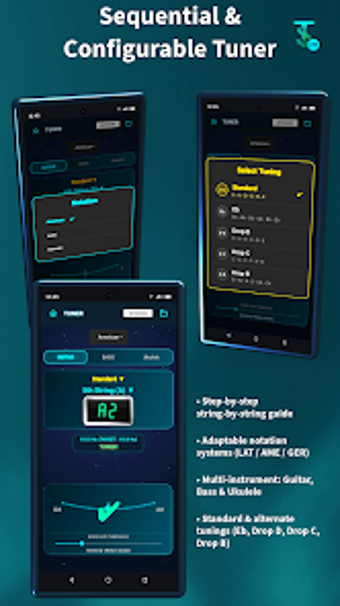
Tuner, metronome, recorder and converter operate together to support rehearsal and on-the-go production: automatic sequential tuning, a visual metronome with LED strobe, background recording, and file conversion. Studio Tools Lite, from Hybrid Projects, packages these utilities into a single Android music utility app, giving musicians and songwriters a local-first workflow and automatic session organisation. The suite targets bands and solo creators who need precise pitch and timing tools during practice and quick session capture.
Combines rehearsal essentials into a single, rehearsal-focused workflow
Studio merges four core tools so you don't switch apps during a session: an automatic sequential tuner with hands-free string progression, an advanced metronome with BPM control and visual flash cues, a background-capable recorder that supports WAV and MP3, and an audio converter that extracts audio from video. The library then organises files by tool and BPM, which simplifies locating takes after a rehearsal.
Supports common audio formats and direct conversion for quick delivery
The recorder writes uncompressed WAV and compressed MP3 files, and the converter extracts audio from video files in seconds, so you can turn voice memos into shareable MP3s without leaving the app. Exports can be pushed manually to Google Drive or Dropbox, which keeps the core workflow local while still offering straightforward external backup when you choose it.
Designed for noisy rehearsal spaces and hands-off tuning
The metronome offers visual flash and a camera LED strobe option, which provides a visible tempo cue in high-volume rooms where an audible click fades. What's more, the tuner’s hands-free progression detects pitch in real time and cycles through strings automatically, which helps when you need to tune an instrument without handling the device.
Balances quick onboarding with functional depth for songwriters and bands
The interface emphasises accuracy and ease of use with real-time visual feedback for tuning and timing, so newcomers can start a session quickly. Advanced users get session naming, structured library organisation, and multiple output formats for production work. The app keeps everything on-device by default, catering to users who prefer local file control and manual cloud export.
In conclusion, a practical rehearsal-focused toolkit with clear trade-offs
In conclusion, Studio is a capable rehearsal and capture tool for musicians who need reliable tuning, visual tempo cues, and quick recording or conversion on Android devices. It prioritises local file control and hands-free tuning, which suits privacy-minded sessions, but that local-first design means cloud backup requires manual exports. The app fits performers who value precise pitch detection and visible metronome signals during loud rehearsals.